Data Models - Entities
Data models make up the entity that is used to configure all form types (Gen 3, 4, and 5). The Data Model tab holds all of the data objects (field’s controls and data relationships) that can be associated with the form that is currently being displayed in Forms Designer. When a form is loaded into Forms Designer, the data model that has been applied to the form type also gets loaded.
See Entity Designer to learn how to create new or edit exiting data models for Forms Designer:
Example Data Model
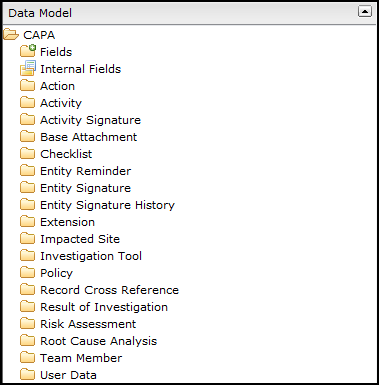
Data Model Definitions
| Folder | Description |
|---|---|
|
Parent Data Member – Main Folder |
The Parent data member is the data model being used for this form. Examples include CAPA, NC, CASE, CHANGE REQUEST, etc. Clicking on this main folder displays all fields, internal fields, and child data members included in the data model that can later be applied to the form, if needed. |
|
Fields Folder |
This folder contains all data fields that can be used in the form. The system also shows a folder for any current disabled fields in the data model entity. |
|
Internal Fields Folder |
This folder contains data fields that capture information for the processing of the data model currently used by SmartSolve to store information. These are not fields that can capture data for new forms and should only be used for read-only fields. Examples include Created By, Record Date, and Closed Date. |
|
Child Data Member Folders |
Child data members are sub-folders that are the containers for data fields and are related to the Parent data model. These are referred to as Child Entities. Examples may include Policies, Team Members, Attachments, and Record Cross References. |
Best Practice Child Data Members
The system automatically pulls in best practice entities into the Data Model which are typically used for various workflows you may be designing for the Studio Technology Solutions and include:
| Folder | Description |
|---|---|
|
Activity Signature |
Activity log of all actions taken by end user in the workflow. |
|
Base Attachment |
Log of all Attachments made by the end user in the workflow. |
|
Entity Signature |
Log of all end user signatures in the workflow. |
|
Entity Signature History |
Log of all end user signatures based on history of approval, rejection, etc. |
|
Record Cross Reference |
Log of all References attached to the workflow (i.e., document, etc.). |
|
User Data |
Tracks data that is not going to save with entity (i.e., approval and rejection information, etc.). |
| Entity Reminder |
Ability to add any task that needs to be a webpart in dashboard – list of reminders for things that need to be done. |